What's New in This Version
SITESPLUS 2010.1
The following items have been changed for this version of SITESPLUS 2010.1:
February 10, 2014
The maximum number of neighborhoods available has been raised from 200 to 400.
November 14, 2013
A user has reported errors when trying to load the demographics from the FIT program into the SITESPLUS FIT Demographics worksheet. This error only happened when the number of sectors was greater than 500. That "artificial" limit has been lifted to 2,000.
November 8, 2013
When running a macro, two of the FIT reports did not create the projected form of the report, but instead created the current form. These errors have been corrected.
In addition, a user has requested the ability to designate distance limits for macro reports. The correct macro-line format for designating a distance limit is:
DISTANCE max
where "max" is the distance limit, in miles.
May 8, 2013
A user has reported that SITESPLUS is reporting distances incorrectly when the project is configured to use kilometers instead of miles. This error has been corrected.
April 12, 2013
A user reports that converting leakage to one store is not working correctly if based on store powers. The command is working correctly if based on even distribution. The trouble was caused because SITESPLUS was not automatically calculating immediately after converting leakage based on store powers. This problem has been corrected.
March 15, 2013
A new command has been added to assist in loading project data from outside sources. The command is "File | Load Tabbed Text File." This will cause SITESPLUS to open a text file of your choice and attempt to read lines of data, adding stores and/or sectors with each data line. Note that the first line MUST be a dictionary line describing the data lines to follow, and all fields MUST be separated using the [Tab] character (not spaces or commas). Download instructions.
March 8, 2013
If your project had store IDs that were quite large (greater than 1000) and you rebuilt one of those stores, SITESPLUS sometimes had trouble representing the new store ID correctly because of decimal-to-binary translation rounding. This problem would most often become visible when opening the project file and receiving Sister Store Addition errors. The problem has been corrected.
December 17, 2012
When using the [Excel Save] buttons in the Store or Sector datasheet, SITESPLUS would correctly generate the Excel files, but the column headers were not "database friendly." That is, the headers contained characters that are illegal in many database programs.
Those column headers have now been changed to be more database friendly. Note that the headers in the datasheets have NOT changed, only the headers in saved Excel files.
December 15, 2012
A user has requested an enhancement to the Data Map graphic, and we have added three new sector label choices:
Black population (count)
Hispanic population (count)
Asian population (count)
December 11, 2012
A user has reported a program crash during the editing of a very large project. The crash only happens if a neighborhood definition contains an extremely long line of characters, greater than 1,024. This error has been corrected.
December 3, 2012
Two changes have been made in response to user requests:
1. A new Change Balance Tolerances command has been added to the Calculate menu. For user with very large models, this command may enable you to save a tremendous amount of time by allowing you to perform the "Balance Powers" command to a limited state of completion.
SITESPLUS normally balances powers until the average misbalance per store is only $.33. During a "rough" balance in a large model, though, you may be able to tolerate a misbalance of $1,000 or more per store. Setting the misbalance figure to $1,000 may save as much as 90% of the balance time while achieving 98% of power accuracy.2. The format for the Projected Chains-2 report has been changed slightly when requesting neighborhoods for the report. The market share figures previously had an asterisk ("*") appended to each market share, referencing a footnote below the report. When converting the report to an Excel sheet, Excel would not see those MS cells as a number because of the asterisk. The asterisk will now appear in the headings instead.
November 16, 2012
A user has reported that the SITESPLUS Excel sheets created from reports would sometimes crash when the user attempted to print those sheets. This did not happen on all computers. The problem has been identified and fixed.
November 6, 2012
The "Surrounding Stores" report can now be used in a macro. Use the key REPORT SUST to access this report.
July 30, 2012
A new report has been added for our FIT users. The "Stores by Format FIT" report will produce one row for each store, showing the FIT for each defined FIT format type.
July 17, 2012
If a user changed the default project radius, the red CA light on the status bar was not always illuminated. That has been corrected. If the project contains more than one model, the user will now also receive a warning that calculations are needed in ALL modes. This may prevent inadvertent changes to the balanced model without calculating.
June 5, 2012
The "Surrounding Stores" report has been altered to now show the curve of each store in a new column. Also, the report sometimes showed Effective Power when it should have showed the simple Power. That error has been corrected.
February 9, 2012
Under special circumstances, SITESPLUS could sometimes save a project with a few lines of corrupted data, causing the user to not be able to successfully open the project file. This error has been corrected.
September 8, 2011
A user has reported that SITESPLUS does not always input and outfit FIT data correctl.y when using the new version of FIT. The new version is FIT 3 and includes expanded demographics in the Education category. This error has been corrected.
August 17, 2011
A user has reported a problem while attempting to open a new project file while one project is already open. When asked to verify the decision to open a different project, SITESPLUS ignores a click on the [Cancel] button and attempts to open the project file anyway. That error has been corrected.
August 10, 2011
All lat/lon coordinates for sectors, barriers and cross-points will now be saved with a precision of 5 digits after the decimal point. That is an accuracy better than 4 feet!
Stores have been saved with this same accuracy since the beginning of July.
August 1, 2011
A user has pointed out that using the command "Subsave to File" does not correctly save all FIT data, if FIT was used. That error has been corrected.
July 11, 2011
FIT reports commonly describe two values: TA FIT, and Site FIT. The exact definitions and use of these two terms has been altered to be more clear.
The "TA FIT" of a store is the arithmetically-averaged FIT value between one store and all sectors within the trade area. The TA FIT of a store will be a consistent value for all reports, no matter how those reports are generated.
The "Site FIT" of a store considers only a subset of the trade area sectors, and the value can vary between reports, depending upon the way the report was generated. For example, the Site FIT value will ordinarily only consider those sectors which are closest. However, if the report is generated using a neighborhood, then the Site FIT will be calculated by considering only those sectors defined in the neighborhood.
July 8, 2011
Store latitudes and longitudes will now be saved with 5-digit precision, which should provide geographic accuracy within about 4 feet. Reports will not show all digits of precision, but the store edit sheet and all calculations will use this increased accuracy.
July 5, 2011
Extremely large models with more than 25 chains defined might crash while attempting to generate one of the chain-style reports. This overflow has been corrected.
After modifying a geoset within the GIS Wizard, the user was not always prompted to save the revised geoset.
The GIS Wizard will now recognize when store sales have been scaled in thousands.
June 3, 2011
Two small changes have been made, which will not affect forecast accuracy.
Extremely large models using loyalty for multiple stores sometimes encountered faulty error messages when the project file was opened. This was due to collective rounding of leakage dollars and has been corrected.
Lat/lon coordinates have previously been saved to project files using four digits to the right of the decimal point. New projects will now save five significant digits. This change will not affect existing project files.
March 23, 2011
The Strategy Map would sometimes not work correctly because of difficulty indexing the block groups. That error has been corrected.
February 25, 2011
A long-standing problem with the deletion of a chain has been corrected. Previously, deleting a chain (using the chain datasheet) would sometimes cause a "scrambling" of chain definitions. That error has now been fixed.
The FIT Store Types datasheet has been modified to be smarter about its opening size, allowing more of the store type columns to be shown.
February 23, 2011
A comprehensive analysis has been performed on the 2009 BLS Consumer Expenditure Diary study, which is the latest detailed information available. The PCW calculator of SITESPLUS 2010.1 has been updated to reflect those findings. The overall mean PCW for supermarket-type merchandise in the U.S. was $44.72.
This change will not affect PCW values already calculated within your saved projects, but will affect all new calculations.
February 4, 2011
A user has reported that the Risk Table report has large rounding errors if the store requested has sister store data. This error has been corrected.
January 27, 2011
A small problem with the new crash recovery system has been repaired.
A new start-up screen has been created to distinguish this release from earlier releases.
When converting leakage to a single store, the leakage has always been taken evenly from all sectors. A new option in the Convert Leakage dialog box will now allow you to specify that the leakage should be taken from sectors in proportion to the strength that store exerts on each sector. That is, sectors close to the store will have more leakage converted than sectors further from the store.
January 18, 2011
A problem with the toolbar locations has been corrected.
December 29, 2010
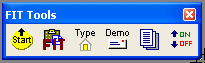
A new toolbar has been added to SITESPLUS which will provide shortcuts for the FIT system, if it is being used.
The tools are (in order above): Start the FIT program, Paste the FIT factor matrix, Enter store format types, open the FIT demographic sheet, create a FIT report, toggle the use of the FIT system on/off.
Note that not all of the tools will be visible all of the time. The collection displayed will depend upon your current data situation and settings.
December 21, 2010
The "Load Data Source" command had a few glitches that caused it to be unreliable. We think those glitches have been corrected.
When rebuilding a store that has loyalty data, SITESPLUS will transfer that original loyalty data to the new (rebuilt) store.
The "Show Effective Power" flag would cause SITESPLUS to show (or not show) a store's effective power rather than its assigned power. However, if the current model had segmentation data or manual powers, effective powers would be shown regardless of the setting. Now all reports will show (or not show) effective powers based on the setting only.
November 29, 2010
An enhanced "crash recovery" system has been added. If the computer or software suddenly crashes as you are working within a project, you will probably be able to recover virtually all data and changes. In the worst case scenario, the data recovered may be as much as five minutes old.
December 2, 2010
The "Show Effective Power" toggle allows a user to specify whether reports will display power or effective power. This has always been a default setting only, not project specific. Now it can be set specific to each project.
There are four "distance-style" reports in SITESPLUS that have always allowed the user to specify a distance limit for the report. Now a user can also specify the width of the distance rings for the report. For example, instead of one-mile rings, you might now request half-mile rings or two-mile rings for the report. This change affects the following four reports:
Distance Demographics Distance Demographics 2
Distance Population Distance MS